
Workout Tracker
Tracks every workout and automatically tells you what to increase next using progressive overload.
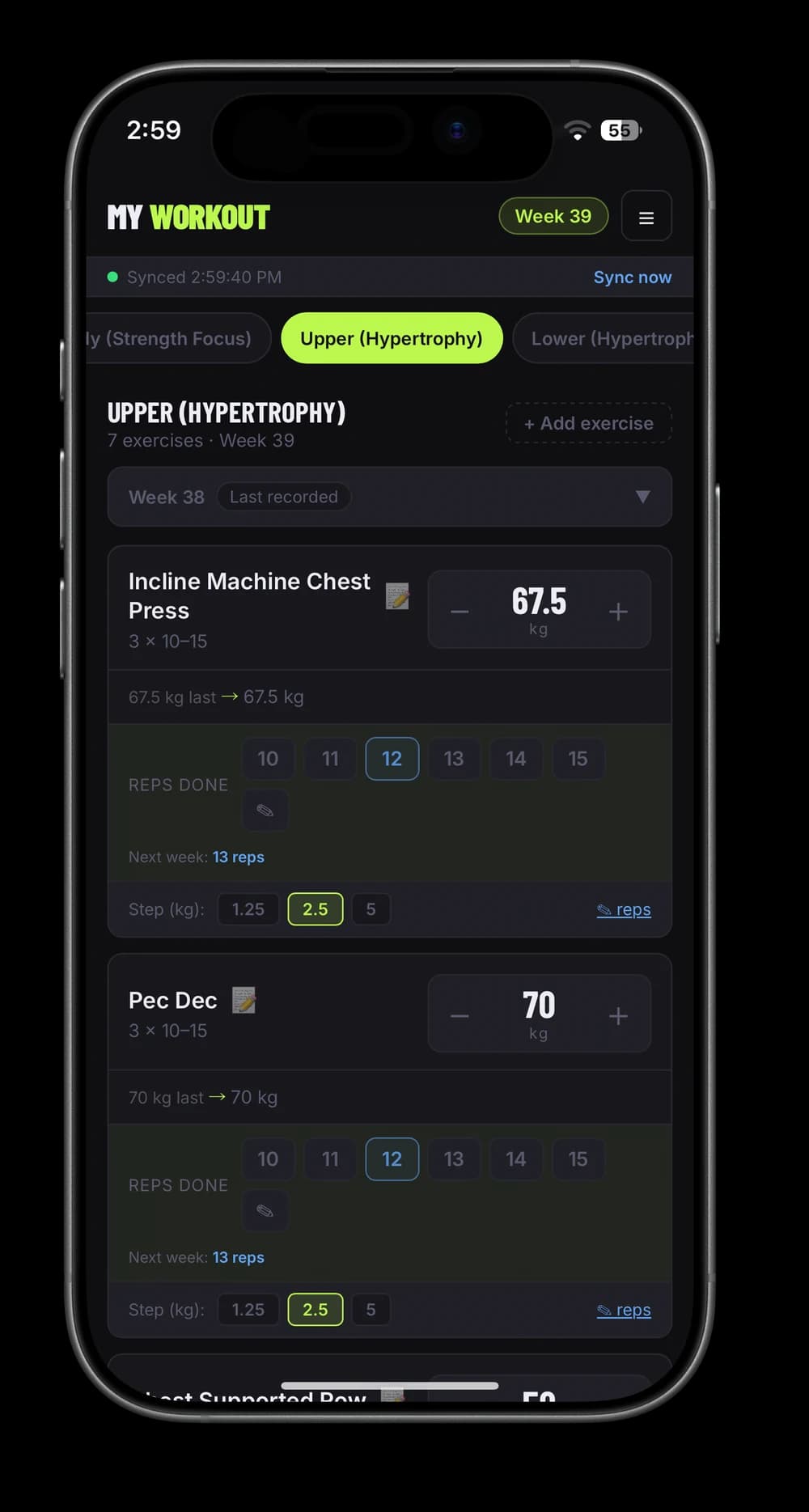
Build your own workout tracker that tells you what to lift next
The app I use for every workout: it logs your sets, then works out next week's weights and reps for you with progressive overload. Works offline, lives on your Home Screen, costs nothing to run.
Time: About 30 minutes. No coding, no build step.
What you'll get
- Your program on your phone, one tab per workout day
- Every exercise shows this week's weight and the reps to aim for
- Next week's targets worked out for you: more reps until you hit the top of the range, then more weight
- Works offline in the gym, syncs to your laptop when you're back online
- Progress charts, goals and notes per exercise, plus undo for everything
- On your Home Screen like a real app, free to run
How it decides what you lift next
Every exercise has a rep range, like 6 to 8. That's the whole trick:
- This week you do 3 × 6 at 60 kg. Next week it suggests 7.
- You hit 7. It suggests 8.
- You hit 8, the top of the range. Next week the weight goes up by 2.5 kg and the reps drop back to 6.
Missed a week for travel? It carries your weights over instead of pushing you up. I tracked this in a spreadsheet for six years. The app just does the math I used to do by hand.
What you'll need before we start
- An iPhone (or any phone with a browser)
- Free accounts at Supabase, GitHub and Vercel. The guide tells you when.
- Your current program, or use mine to start
Time: About 30 minutes.
Get the app
The same app I use, cleaned of my keys, with my program as a starting point. Four files and a database script, no build step.
ZIP · 81 KB
Workout Tracker starter kit
- The whole app, ready to upload
- The database script, locked to your account
- Instructions that turn Claude into your setup helper
- My program to start with, easy to swap for yours
1. Create the database
- At supabase.com, create a free project.
- Open SQL Editor, paste the first part of
supabase/setup.sql(the table and row level security) and run it. - Go to Authentication → Users → Add user, enter your email and a password, and tick Auto Confirm User.
- Copy your new user's ID, paste it into both places in the policy at the bottom of
setup.sql, and run that part.
create table workout_data (
  key         text primary key,
  value       jsonb,
  updated_at  timestamptz default now()
);

alter table workout_data enable row level security;

create policy owner_only on workout_data for all to authenticated
using (auth.uid() = 'YOUR-USER-ID') with check (auth.uid() = 'YOUR-USER-ID');2. Connect the app
In Supabase, open Project Settings → API. Copy the Project URL and the anon public key into the top of app/app.js:
const SB_URL='https://YOUR-PROJECT.supabase.co';
const SB_KEY='YOUR-ANON-PUBLIC-KEY';
3. Put it online
- Create a free GitHub account and a new private repository.
- Choose Add file → Upload files and drag in everything inside the
appfolder. - At vercel.com, sign in with GitHub, choose Add New → Project, import the repository and press Deploy. There's nothing to configure.
4. Put it on your phone
Open your new site in Safari, tap Share → Add to Home Screen, then open it from there and log in with the user you created. It now works like an app, offline included.
Make it yours
The app starts with my four-day program. You can edit exercises, sets and rep ranges inside the app (menu → Manage Exercises). For a whole new split, it's faster to ask Claude:
- In Claude, create a Project, paste
CLAUDE-PROJECT-INSTRUCTIONS.mdfrom the kit into its instructions, and add the kit's files to its knowledge. - Tell it your split: days, exercises, sets and rep ranges.
- It hands you a new
DEFAULT_PROGRAMforapp.js. Upload that file to GitHub again and Vercel redeploys on its own.
The same Claude Project can walk you through every step above if you get stuck.
The progression rule, in code
This is the heart of the app. Once a week it runs this for every exercise:
// Did you reach the top of the rep range last week?
const effectiveReps = logged !== null ? logged : prevSuggested;
const hitTop = effectiveReps !== null && effectiveReps >= ex.rMax;

// Yes: add weight and start the range again. No: one more rep.
nextWeight[ex.id] = hitTop ? weight + step : weight;
nextReps[ex.id] = hitTop
  ? ex.rMin
  : Math.min((logged ?? prevSuggested ?? ex.rMin) + 1, ex.rMax);
If you forget to log your reps, it treats the suggestion as done, so a forgotten tap doesn't stall your progress.
Troubleshooting
Login fails. Check the user exists under Authentication → Users and is confirmed, and that the URL and key in app.js are from the same project.
It logs in but nothing syncs. The user ID in the policy doesn't match your user. Copy it again from Authentication → Users and re-run the policy.
My phone still shows the old version. Close the app fully and reopen it. If you edit the files yourself, bump the VERSION number at the top of sw.js so phones fetch the new one.
If you build it, show me your first week. Tag @cezarhere.