Social Media Widget
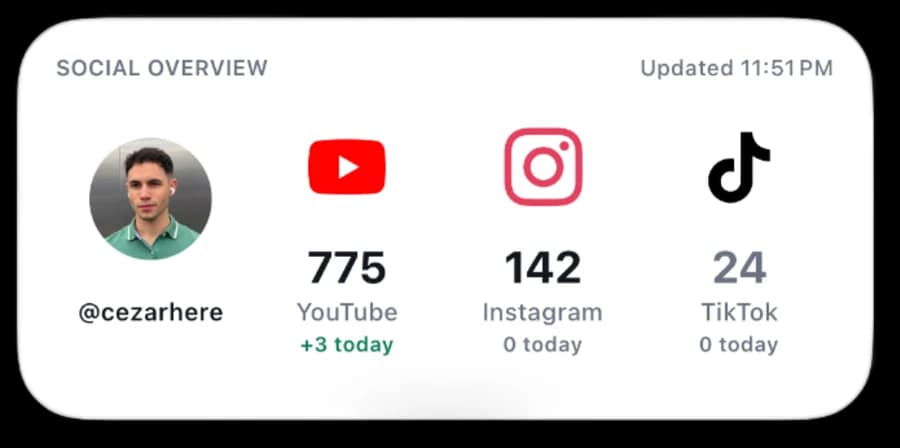
An iPhone widget showing your YouTube, Instagram and TikTok numbers, plus what changed today.
Build your own live social media dashboard for iPhone
A clean Home Screen widget with your profile photo, YouTube subscribers, Instagram followers, TikTok followers, and how much each one moved today.
Time: 20 to 30 minutes for YouTube and Instagram. TikTok is an optional advanced setup.
What you'll get
- A crisp, four-column iOS widget built with native Scriptable elements
- Live YouTube, Instagram and TikTok counts
- Your profile image and each platform's logo
- Local daily tracking that shows +X today, 0 today, or −X today
- Credentials stored in the iOS Keychain rather than exposed in the widget
What you'll need before we start
- An iPhone or iPad
- Scriptable, free on the App Store
- A public YouTube channel
- An Instagram Business or Creator account
- A TikTok Developer account, only if you want TikTok numbers
Time: About 20 to 30 minutes for YouTube and Instagram. TikTok is optional and takes longer.
Set it up with Claude
Stuck on a step, or want a guide by your side? Copy this into Claude and answer its questions.
I'm setting up the Social Media Widget for Scriptable on my iPhone, from
cezarhere.com/social-media-widget. It shows my YouTube, Instagram
and TikTok follower counts. Guide me one step at a time, wait for me to say
"done" before the next step, and keep it short.

The platforms I want: [YouTube / Instagram / TikTok].
Where I am right now: [haven't started / installing the script /
creating the YouTube API key / setting up the Meta app for Instagram /
setting up TikTok Login Kit / adding the widget].

Never ask me to paste API keys, access tokens or client secrets into this
chat. The widget asks for them itself and saves them in the iOS Keychain.
If something fails, ask me for the exact error message.Get the widget
On your iPhone, tap Copy. You'll paste the whole thing into Scriptable in the next step. On a computer, Download saves the file instead.
const CONFIG = {
  handle: "@YOUR_HANDLE",
  profileImageURL: "", // Optional override. Otherwise an API avatar is used.
  refreshMinutes: 30,
  useICloud: true,
  resetStoredCredentials: false, // Set true for one app run to wipe saved keys/tokens.

  youtube: {
    channelId: "",       // Preferred: UCxxxxxxxxxxxxxxxxxxxxxx
    channelHandle: "@YOUR_YOUTUBE_HANDLE",
    apiKey: "",          // Optional here; safer to enter on first app run.
  },

  instagram: {
    apiBase: "https://graph.instagram.com",
    userId: "me",
    accessToken: "",     // Optional here; safer to enter on first app run.
  },

  tiktok: {
    // Tokens now come from the Keychain, written by the TikTok helper script.
    clientKey: "PASTE_YOUR_TIKTOK_CLIENT_KEY", // only if you use TikTok
  },

  brandIcons: {
    youtube: "https://cezarhere.com/downloads/social-dashboard/brand/youtube-v2.png",
    instagram: "https://cezarhere.com/downloads/social-dashboard/brand/instagram-v2.png",
    tiktok: "https://cezarhere.com/downloads/social-dashboard/brand/tiktok-v2.png",
  },
};

const KEYCHAIN = {
  youtube: "social-dashboard.youtube-api-key",
  instagram: "social-dashboard.instagram-access-token",
};

// Must match the keys used by the TikTok helper script.
const TIKTOK_KEYS = {
  access: "social-dashboard.tiktok-access-token",
  refresh: "social-dashboard.tiktok-refresh-token",
  accessExpiry: "social-dashboard.tiktok-access-expiry",
  refreshExpiry: "social-dashboard.tiktok-refresh-expiry",
  clientSecret: "social-dashboard.tiktok-client-secret",
};

const COLORS = {
  background: new Color("FFFFFF"),
  primary: new Color("12161D"),
  secondary: new Color("6B7280"),
  hairline: new Color("E5E7EB"),
  youtube: new Color("FF0000"),
  instagram: new Color("E4405F"),
  tiktok: new Color("000000"),
  positive: new Color("087A55"),
  negative: new Color("D92D20"),
};

const COLUMN_WIDTH = 80;
const BODY_HEIGHT = 104;

const fm = CONFIG.useICloud ? FileManager.iCloud() : FileManager.local();
const statePath = fm.joinPath(fm.documentsDirectory(), "social-dashboard-history.json");

if (!config.runsInWidget && CONFIG.resetStoredCredentials) {
  for (const key of [...Object.values(KEYCHAIN), ...Object.values(TIKTOK_KEYS)]) {
    if (Keychain.contains(key)) Keychain.remove(key);
  }
}

const credentials = {
  youtube: await credential(KEYCHAIN.youtube, CONFIG.youtube.apiKey, "YouTube API key"),
  instagram: await credential(KEYCHAIN.instagram, CONFIG.instagram.accessToken, "Instagram access token"),
};

let state = await readState();
const previous = state.lastGood || {};

const results = await Promise.all([
  safeFetch(fetchYouTube, previous.youtube),
  safeFetch(fetchInstagram, previous.instagram),
  safeFetch(fetchTikTok, previous.tiktok),
]);

const youtube = results[0];
const instagram = results[1];
const tiktok = results[2];

// Surface failures in the Scriptable console instead of hiding them.
for (const [name, value] of Object.entries({ youtube, instagram, tiktok })) {
  if (!value.live) console.warn(name + " fetch failed: " + value.error);
  else console.log(name + " OK: " + value.count);
}

const today = localDateKey(new Date());
state.days = state.days || {};
state.days[today] = state.days[today] || {};

if (!state.deltaTrackingStartedOn) {
  state.deltaTrackingStartedOn = today;
}
if (today !== state.deltaTrackingStartedOn && !state.days[today].baseline) {
  state.days[today].baseline = {
    youtube: previous.youtube && isNumber(previous.youtube.count) ? previous.youtube.count : null,
    instagram: previous.instagram && isNumber(previous.instagram.count) ? previous.instagram.count : null,
    tiktok: previous.tiktok && isNumber(previous.tiktok.count) ? previous.tiktok.count : null,
  };
}

const todayBaseline = state.days[today].baseline || {};
const deltas = {
  youtube: dailyDelta(youtube.count, todayBaseline.youtube),
  instagram: dailyDelta(instagram.count, todayBaseline.instagram),
  tiktok: dailyDelta(tiktok.count, todayBaseline.tiktok),
};

for (const [name, value] of Object.entries({ youtube, instagram, tiktok })) {
  if (value.live && isNumber(value.count)) {
    state.lastGood = state.lastGood || {};
    state.lastGood[name] = {
      count: value.count,
      avatar: value.avatar || "",
      fetchedAt: new Date().toISOString(),
    };
  }
}

state.updatedAt = new Date().toISOString();
state.days = keepRecentDays(state.days, 14);
await writeState(state);

const avatarURL = CONFIG.profileImageURL || youtube.avatar || instagram.avatar || tiktok.avatar;
const [avatar, youtubeIcon, instagramIcon, tiktokIcon] = await Promise.all([
  loadImageOrSymbol(avatarURL, "person.crop.circle.fill"),
  loadRemoteImage(CONFIG.brandIcons.youtube),
  loadRemoteImage(CONFIG.brandIcons.instagram),
  loadRemoteImage(CONFIG.brandIcons.tiktok),
]);
const widget = buildWidget({
  youtube,
  instagram,
  tiktok,
  deltas,
  avatar,
  brandIcons: { youtube: youtubeIcon, instagram: instagramIcon, tiktok: tiktokIcon },
});
widget.refreshAfterDate = new Date(Date.now() + CONFIG.refreshMinutes * 60 * 1000);

if (config.runsInWidget) {
  Script.setWidget(widget);
} else {
  await widget.presentMedium();
}
Script.complete();

async function credential(key, configuredValue, label) {
  if (configuredValue && !configuredValue.startsWith("PASTE_")) return configuredValue;
  if (Keychain.contains(key)) return Keychain.get(key);
  if (config.runsInWidget) return "";

  const prompt = new Alert();
  prompt.title = label;
  prompt.message = "Paste it once. Scriptable will keep it in the iOS Keychain.";
  prompt.addSecureTextField(label, "");
  prompt.addAction("Save");
  prompt.addCancelAction("Skip");
  const choice = await prompt.presentAlert();
  const value = prompt.textFieldValue(0).trim();
  if (choice === 0 && value) Keychain.set(key, value);
  return value;
}

async function safeFetch(fetcher, cached) {
  try {
    const value = await fetcher();
    return { ...value, live: true, error: "" };
  } catch (error) {
    return {
      count: cached && cached.count,
      avatar: cached && cached.avatar,
      live: false,
      error: String(error),
    };
  }
}

async function fetchYouTube() {
  if (!credentials.youtube) throw new Error("Missing YouTube API key");
  const params = ["part=snippet%2Cstatistics"];
  if (CONFIG.youtube.channelId) {
    params.push("id=" + encodeURIComponent(CONFIG.youtube.channelId));
  } else {
    params.push("forHandle=" + encodeURIComponent(CONFIG.youtube.channelHandle));
  }
  params.push("key=" + encodeURIComponent(credentials.youtube));

  const json = await getJSON("https://www.googleapis.com/youtube/v3/channels?" + params.join("&"));
  if (!json.items || !json.items.length) throw new Error("YouTube channel not found");
  const channel = json.items[0];
  if (channel.statistics.hiddenSubscriberCount) throw new Error("Subscriber count is hidden");
  return {
    count: Number(channel.statistics.subscriberCount),
    avatar: bestThumbnail(channel.snippet && channel.snippet.thumbnails),
  };
}

async function fetchInstagram() {
  if (!credentials.instagram) throw new Error("Missing Instagram access token");
  const fields = "id,username,followers_count,profile_picture_url";
  const url = CONFIG.instagram.apiBase + "/" + encodeURIComponent(CONFIG.instagram.userId)
    + "?fields=" + encodeURIComponent(fields)
    + "&access_token=" + encodeURIComponent(credentials.instagram);
  const json = await getJSON(url);
  if (json.error) throw new Error(json.error.message || "Instagram API error");
  return { count: Number(json.followers_count), avatar: json.profile_picture_url || "" };
}

// ---------- TikTok ----------

function readKey(key) {
  return Keychain.contains(key) ? Keychain.get(key) : "";
}

async function getTikTokToken(forceRefresh) {
  const access = readKey(TIKTOK_KEYS.access);
  const expiry = Number(readKey(TIKTOK_KEYS.accessExpiry)) || 0;

  // Use the stored token if it is still valid for 10+ minutes
  // (or if we have no expiry info and aren't forcing a refresh).
  if (!forceRefresh && access && (!expiry || expiry - Date.now() > 10 * 60 * 1000)) {
    return access;
  }

  const refreshToken = readKey(TIKTOK_KEYS.refresh);
  const clientSecret = readKey(TIKTOK_KEYS.clientSecret);
  if (!refreshToken) throw new Error("No TikTok refresh token. Run the TikTok helper script.");
  if (!clientSecret) throw new Error("No TikTok client secret saved. Run the TikTok helper script.");

  const refreshExpiry = Number(readKey(TIKTOK_KEYS.refreshExpiry)) || 0;
  if (refreshExpiry && refreshExpiry < Date.now()) {
    throw new Error("TikTok refresh token expired. Run the TikTok helper script again.");
  }

  const body = [
    ["client_key", CONFIG.tiktok.clientKey],
    ["client_secret", clientSecret],
    ["grant_type", "refresh_token"],
    ["refresh_token", refreshToken],
  ].map(([k, v]) => encodeURIComponent(k) + "=" + encodeURIComponent(v)).join("&");

  const req = new Request("https://open.tiktokapis.com/v2/oauth/token/");
  req.method = "POST";
  req.headers = { "Content-Type": "application/x-www-form-urlencoded" };
  req.body = body;
  req.timeoutInterval = 15;
  const json = await req.loadJSON();

  if (!json.access_token) {
    throw new Error("TikTok refresh failed: " + (json.error_description || json.error || JSON.stringify(json)));
  }

  const now = Date.now();
  Keychain.set(TIKTOK_KEYS.access, json.access_token);
  if (json.refresh_token) Keychain.set(TIKTOK_KEYS.refresh, json.refresh_token); // refresh tokens can rotate
  if (json.expires_in) Keychain.set(TIKTOK_KEYS.accessExpiry, String(now + json.expires_in * 1000));
  if (json.refresh_expires_in) Keychain.set(TIKTOK_KEYS.refreshExpiry, String(now + json.refresh_expires_in * 1000));
  return json.access_token;
}

async function tiktokUserInfo(token) {
  const fields = "display_name,avatar_url,follower_count";
  const req = new Request("https://open.tiktokapis.com/v2/user/info/?fields=" + encodeURIComponent(fields));
  req.headers = { Authorization: "Bearer " + token };
  req.timeoutInterval = 15;
  const json = await req.loadJSON();
  const status = req.response ? req.response.statusCode : 0;
  return { json, status };
}

function isTikTokAuthError(result) {
  const code = result.json && result.json.error && result.json.error.code;
  return result.status === 401 || code === "access_token_invalid";
}

async function fetchTikTok() {
  let token = await getTikTokToken(false);
  let result = await tiktokUserInfo(token);

  // If the token was rejected, force one refresh and retry once.
  if (isTikTokAuthError(result)) {
    token = await getTikTokToken(true);
    result = await tiktokUserInfo(token);
  }

  const json = result.json;
  if (json.error && json.error.code && json.error.code !== "ok") {
    throw new Error("TikTok " + json.error.code + ": " + (json.error.message || "unknown error"));
  }
  if (!json.data || !json.data.user) throw new Error("TikTok returned no user (HTTP " + result.status + ")");
  return {
    count: Number(json.data.user.follower_count),
    avatar: json.data.user.avatar_url || "",
  };
}

// ---------- Shared helpers ----------

async function getJSON(url) {
  const req = new Request(url);
  req.timeoutInterval = 15;
  return await req.loadJSON();
}

function buildWidget(data) {
  const w = new ListWidget();
  w.backgroundColor = COLORS.background;
  w.setPadding(0, 0, 0, 0);
  w.url = "scriptable:///run/" + encodeURIComponent(Script.name());

  const header = w.addStack();
  header.layoutHorizontally();
  header.centerAlignContent();
  header.setPadding(15, 16, 0, 16);

  const title = header.addText("SOCIAL OVERVIEW");
  title.font = Font.semiboldSystemFont(9);
  title.textColor = COLORS.secondary;
  title.lineLimit = 1;

  header.addSpacer();

  const updated = header.addText("Updated " + shortTime(new Date()));
  updated.font = Font.mediumSystemFont(9);
  updated.textColor = COLORS.secondary;
  updated.lineLimit = 1;

  w.addSpacer(10);

  const body = w.addStack();
  body.layoutHorizontally();
  body.topAlignContent();
  body.addSpacer();

  addProfileColumn(body, data.avatar);
  addMetricColumn(body, data.brandIcons.youtube, "YouTube", data.youtube, data.deltas.youtube, "play.rectangle.fill", 30);
  addMetricColumn(body, data.brandIcons.instagram, "Instagram", data.instagram, data.deltas.instagram, "camera.fill", 26);
  addMetricColumn(body, data.brandIcons.tiktok, "TikTok", data.tiktok, data.deltas.tiktok, "music.note", 26);

  body.addSpacer();
  w.addSpacer();
  return w;
}

function addProfileColumn(parent, avatar) {
  const column = parent.addStack();
  column.layoutVertically();
  column.size = new Size(COLUMN_WIDTH, BODY_HEIGHT);

  column.addSpacer(13);
  addCenteredImage(column, avatar, 50, true);
  column.addSpacer(5);
  addEmptyRow(column, 9);
  addCenteredText(column, CONFIG.handle, Font.semiboldSystemFont(10), COLORS.primary, 14, 0.75);
  addEmptyRow(column, 13);
}

function addMetricColumn(parent, suppliedIcon, label, result, delta, fallbackSymbol, iconSize) {
  const fallbackIcons = {
    "play.rectangle.fill": SFSymbol.named("play.rectangle.fill").image,
    "camera.fill": SFSymbol.named("camera.fill").image,
    "music.note": SFSymbol.named("music.note").image,
  };

  const column = parent.addStack();
  column.layoutVertically();
  column.size = new Size(COLUMN_WIDTH, BODY_HEIGHT);

  addCenteredImage(column, suppliedIcon || fallbackIcons[fallbackSymbol], iconSize, false);
  column.addSpacer(5);

  const countColor = result.live ? COLORS.primary : COLORS.secondary;
  const count = isNumber(result.count) ? compactNumber(result.count) : "—";
  addCenteredText(column, count, Font.boldSystemFont(20), countColor, 22, 0.7);
  addCenteredText(column, label, Font.mediumSystemFont(10), COLORS.secondary, 14, 0.75);

  // If the live fetch failed, say so instead of silently showing a stale number.
  if (!result.live) {
    addCenteredText(column, "cached", Font.semiboldSystemFont(8.5), COLORS.negative, 13, 0.65);
    return;
  }

  const deltaColor = delta > 0 ? COLORS.positive : delta < 0 ? COLORS.negative : COLORS.secondary;
  addCenteredText(column, formatDelta(delta), Font.semiboldSystemFont(8.5), deltaColor, 13, 0.65);
}

function addCenteredImage(parent, sourceImage, size, circular) {
  const row = parent.addStack();
  row.layoutHorizontally();
  row.centerAlignContent();
  row.size = new Size(COLUMN_WIDTH, 50);
  row.addSpacer();

  const image = row.addImage(sourceImage);
  image.imageSize = new Size(size, size);
  image.resizable = true;
  image.centerAlignImage();
  if (circular) {
    image.cornerRadius = size / 2;
    image.applyFillingContentMode();
  } else {
    image.applyFittingContentMode();
  }

  row.addSpacer();
}

function addCenteredText(parent, value, font, color, rowHeight, minimumScaleFactor) {
  const row = parent.addStack();
  row.layoutHorizontally();
  row.centerAlignContent();
  row.size = new Size(COLUMN_WIDTH, rowHeight);
  row.addSpacer();

  const text = row.addText(value);
  text.font = font;
  text.textColor = color;
  text.lineLimit = 1;
  text.minimumScaleFactor = minimumScaleFactor;

  row.addSpacer();
  return text;
}

function addEmptyRow(parent, height) {
  const row = parent.addStack();
  row.size = new Size(COLUMN_WIDTH, height);
}

function formatDelta(value) {
  if (!isNumber(value)) return "tomorrow";
  if (value > 0) return "+" + compactNumber(value) + " today";
  if (value < 0) return "−" + compactNumber(Math.abs(value)) + " today";
  return "0 today";
}

function dailyDelta(current, baseline) {
  return isNumber(current) && isNumber(baseline) ? current - baseline : null;
}

function compactNumber(value) {
  const n = Number(value);
  if (n >= 1000000) return trim(n / 1000000) + "M";
  if (n >= 1000) return trim(n / 1000) + "K";
  return String(Math.round(n));
}

function trim(value) {
  return value.toFixed(value >= 100 ? 0 : value >= 10 ? 1 : 2).replace(/\.0+$|(?<=\.[0-9])0+$/, "");
}

function shortTime(date) {
  const formatter = new DateFormatter();
  formatter.useShortTimeStyle();
  return formatter.string(date);
}

function localDateKey(date) {
  const formatter = new DateFormatter();
  formatter.dateFormat = "yyyy-MM-dd";
  return formatter.string(date);
}

function isNumber(value) {
  return typeof value === "number" && Number.isFinite(value);
}

function bestThumbnail(thumbnails) {
  if (!thumbnails) return "";
  return (thumbnails.high || thumbnails.medium || thumbnails.default || {}).url || "";
}

async function loadImageOrSymbol(url, fallbackSymbol) {
  if (url) {
    try {
      const req = new Request(url);
      req.timeoutInterval = 10;
      return await req.loadImage();
    } catch (_) {}
  }
  return SFSymbol.named(fallbackSymbol).image;
}

async function loadRemoteImage(url) {
  if (!url) return null;
  try {
    const req = new Request(url);
    req.timeoutInterval = 10;
    return await req.loadImage();
  } catch (_) {
    return null;
  }
}

async function readState() {
  try {
    if (!fm.fileExists(statePath)) return { version: 1, days: {}, lastGood: {} };
    if (CONFIG.useICloud && !fm.isFileDownloaded(statePath)) {
      await fm.downloadFileFromiCloud(statePath);
    }
    return JSON.parse(fm.readString(statePath));
  } catch (_) {
    return { version: 1, days: {}, lastGood: {} };
  }
}

async function writeState(value) {
  try {
    fm.writeString(statePath, JSON.stringify(value, null, 2));
  } catch (error) {
    console.warn("Could not save dashboard history: " + error);
  }
}

function keepRecentDays(days, limit) {
  const keys = Object.keys(days || {}).sort().slice(-limit);
  const kept = {};
  for (const key of keys) kept[key] = days[key];
  return kept;
}
TikTok users will also need the helper that connects your account:
const CLIENT_KEY = "PASTE_YOUR_TIKTOK_CLIENT_KEY";
const REDIRECT_URI = "PASTE_YOUR_EXACT_TIKTOK_REDIRECT_URI";

// Must match the keys used in SocialDashboard.
const ACCESS_TOKEN_KEY = "social-dashboard.tiktok-access-token";
const REFRESH_TOKEN_KEY = "social-dashboard.tiktok-refresh-token";
const ACCESS_EXPIRY_KEY = "social-dashboard.tiktok-access-expiry";
const REFRESH_EXPIRY_KEY = "social-dashboard.tiktok-refresh-expiry";
const CLIENT_SECRET_KEY = "social-dashboard.tiktok-client-secret";

async function askForCredentials() {
  const hasSecret = Keychain.contains(CLIENT_SECRET_KEY);

  const prompt = new Alert();
  prompt.title = "Connect TikTok";
  prompt.message = hasSecret
    ? "Paste the one-time authorization code (or the full redirect URL). Your saved Client Secret will be reused. Leave the secret field empty to keep it."
    : "Paste the one-time authorization code (or the full redirect URL) and your Client Secret. The secret is saved to the iOS Keychain so the widget can refresh tokens automatically.";
  prompt.addTextField("Authorization code or URL", Pasteboard.paste() || "");
  prompt.addSecureTextField("Client Secret", "");
  prompt.addAction("Exchange and save tokens");
  prompt.addCancelAction("Cancel");

  const choice = await prompt.presentAlert();
  if (choice === -1) return null;

  return {
    code: cleanCode(prompt.textFieldValue(0)),
    clientSecret: prompt.textFieldValue(1).trim() || (hasSecret ? Keychain.get(CLIENT_SECRET_KEY) : ""),
  };
}

// Accepts a bare code or a full redirect URL, and undoes URL-encoding
// (TikTok codes often contain characters like %2A that must be decoded).
function cleanCode(raw) {
  let value = (raw || "").trim();
  const match = value.match(/[?&]code=([^&#]+)/);
  if (match) value = match[1];
  if (value.includes("%")) {
    try { value = decodeURIComponent(value); } catch (_) {}
  }
  return value;
}

async function showResult(title, message) {
  const alert = new Alert();
  alert.title = title;
  alert.message = message;
  alert.addAction("OK");
  await alert.presentAlert();
}

async function exchangeCode(code, clientSecret) {
  const form = [
    ["client_key", CLIENT_KEY],
    ["client_secret", clientSecret],
    ["code", code],
    ["grant_type", "authorization_code"],
    ["redirect_uri", REDIRECT_URI],
  ]
    .map(([key, value]) => `${encodeURIComponent(key)}=${encodeURIComponent(value)}`)
    .join("&");

  const request = new Request("https://open.tiktokapis.com/v2/oauth/token/");
  request.method = "POST";
  request.headers = { "Content-Type": "application/x-www-form-urlencoded" };
  request.body = form;
  request.timeoutInterval = 30;

  const response = await request.loadJSON();
  if (!response.access_token) {
    const reason = response.error_description || response.error || "TikTok did not return an access token.";
    throw new Error(reason);
  }
  return response;
}

async function main() {
  const credentials = await askForCredentials();
  if (!credentials) return;
  if (!credentials.code || !credentials.clientSecret) {
    await showResult("Missing information", "An authorization code and a Client Secret are both required.");
    return;
  }

  try {
    const tokens = await exchangeCode(credentials.code, credentials.clientSecret);
    const now = Date.now();
    Keychain.set(ACCESS_TOKEN_KEY, tokens.access_token);
    Keychain.set(CLIENT_SECRET_KEY, credentials.clientSecret);
    if (tokens.refresh_token) Keychain.set(REFRESH_TOKEN_KEY, tokens.refresh_token);
    if (tokens.expires_in) Keychain.set(ACCESS_EXPIRY_KEY, String(now + tokens.expires_in * 1000));
    if (tokens.refresh_expires_in) Keychain.set(REFRESH_EXPIRY_KEY, String(now + tokens.refresh_expires_in * 1000));

    await showResult(
      "TikTok connected",
      "Tokens and the Client Secret are stored in the iOS Keychain. The widget will now refresh the access token on its own. You can run SocialDashboard."
    );
  } catch (error) {
    await showResult(
      "Exchange failed",
      `${error.message}\n\nIf TikTok says the code is invalid or expired, generate a new authorization code and run this helper again.`
    );
  }
}

await main();
Script.complete();
1. Install the Scriptable widget
- Tap Copy on the widget code above.
- Open Scriptable on your iPhone.
- Tap + to create a new script.
- Name it SocialDashboard.
- Paste everything into the new script.
- At the top of the script, replace
@YOUR_HANDLEwith the handle you want displayed, and@YOUR_YOUTUBE_HANDLEwith your exact YouTube handle. - Using TikTok? Also paste your TikTok Client Key over
PASTE_YOUR_TIKTOK_CLIENT_KEY. You'll get it in step 4. - Tap Done.
Don't run it yet. We'll create the credentials first.
2. Connect YouTube
YouTube is the easiest platform, because public channel statistics only need an API key.
- Open the Google Cloud Console.
- Create a new project or select an existing one.
- Go to APIs & Services → Library.
- Search for YouTube Data API v3 and enable it.
- Go to APIs & Services → Credentials.
- Select Create credentials → API key.
- Edit the key and restrict its API access to YouTube Data API v3.
- Copy the API key.
- Run SocialDashboard in Scriptable.
- Paste the key when Scriptable asks for the YouTube API key.
3. Connect Instagram
- Sign in at Meta for Developers.
- Select Create App.
- Choose the Instagram use case named roughly Manage messaging & content on Instagram.
- Open Use cases → Customize → Instagram API.
- Choose API setup with Instagram login.
- Add the
instagram_business_basicpermission. That's the one that covers follower count and profile information. - If your app is still in development: open App roles, add your Instagram username as an Instagram Tester, then accept the invitation from Instagram's Apps and Websites settings.
- Return to the Instagram API setup and choose Add account or Generate access token.
- Authorize your professional Instagram account.
- Copy the generated access token.
- Run SocialDashboard in Scriptable and paste it when asked for the Instagram access token.
The widget requests followers_count and profile_picture_url directly from Instagram, so there's no separate profile-picture API to set up.
4. Connect TikTok (optional, advanced)
TikTok doesn't offer a simple public follower-count API key. It uses OAuth, and follower statistics need the user.info.stats scope.
- Sign in at TikTok for Developers.
- Create an app. For testing your own account, start with a Sandbox.
- Add Login Kit.
- Add a Web platform.
- Supply an app icon, an app description, a website URL, a Terms of Service URL, a Privacy Policy URL, and an exact HTTPS redirect URI.
- Add the scopes
user.info.basicanduser.info.stats. - Add your TikTok account as a Sandbox target user.
- Apply and save the changes.
- Copy your Client Key into
SocialDashboard(theclientKeyline near the top). Keep the Client Secret private. - Copy the
TikTokConnect.jshelper from the top of this guide and paste it into a second Scriptable script named TikTokConnect. - In that script, replace
PASTE_YOUR_TIKTOK_CLIENT_KEYandPASTE_YOUR_EXACT_TIKTOK_REDIRECT_URIwith your own values. - Complete TikTok's authorization flow using the exact same redirect URI.
- Copy the one-time authorization code from your redirect page. Copying the whole redirect URL works too.
- Run TikTokConnect. It fills in the code from your clipboard.
- Enter your Client Secret and tap Exchange and save tokens.
The helper saves your tokens and Client Secret in the iOS Keychain. From then on the widget refreshes its TikTok access token on its own, so you only run the helper again if TikTok ever asks you to reconnect.
5. Add it to your Home Screen
- Long-press an empty area of your Home Screen.
- Tap Edit → Add Widget.
- Search for Scriptable.
- Choose the medium rectangular widget and add it.
- Long-press the new widget and select Edit Widget.
- Under Script, choose SocialDashboard.
- Wait a few seconds for the first refresh.
How "today" is calculated
The first successful run stores each platform's count in a local JSON file in Scriptable's iCloud folder. On the next calendar day, the widget compares the latest count with that saved baseline.
- +8 today means the count went up by eight.
- 0 today means no change.
- −2 today means it went down by two.
- tomorrow means the widget is still setting its first baseline.
Because iOS controls widget refresh timing, "today" is an approximation based on the first successful refresh, not a guaranteed midnight snapshot.
Refresh behavior
The script asks for a refresh after 30 minutes, but iOS decides when widgets actually run. It may hold background updates for several hours, then refresh shortly after you look at that Home Screen page.
The time in the top-right corner shows when the script last completed a successful run. Tapping the widget opens Scriptable and refreshes immediately.
Troubleshooting
A platform says "cached" or shows a dash. "Cached" means the latest fetch failed and you're seeing the last good number; a dash means it has never fetched. Confirm you pasted the right credential. Run the script inside Scriptable and look for an error. Check whether the token expired, and that the required API or scope is enabled.
The widget still shows old numbers. Wait a few seconds after returning to the Home Screen, or run the script manually inside Scriptable. Confirm Background App Refresh is on for Scriptable. iOS, not the script, controls the final refresh schedule.
Instagram says "Insufficient Developer Role". Add the account under App roles → Instagram Tester, accept the invitation from that Instagram account, then generate the token again.
TikTok returns no follower count. Confirm user.info.stats is added to the app, re-authorize after adding the scope, exchange the new authorization code for a new token, and check the redirect URI matches character for character.
Security and privacy
- API credentials are saved in the iOS Keychain.
- Daily counts are stored locally in
social-dashboard-history.json. - The widget never sends your credentials to me.
- Never publish a screenshot showing an access token, client secret or API key.
- If you accidentally expose a credential, revoke it and create a new one.
FAQ
Do I need a Facebook Page for Instagram? No, not with Instagram API with Instagram Login. You do need a Facebook account to get into Meta for Developers.
Do I need a separate API for the profile picture? No. The widget uses the picture returned by YouTube, Instagram or TikTok. You can also set a custom profileImageURL at the top of the script.
Can I use a personal Instagram account? No. Switch it to Creator or Business first.
Why does it say "tomorrow"? The first day sets the baseline. Daily changes start after the date changes and the widget runs again.
Will it really update every 30 minutes? It asks for that, but iOS can delay it. That's standard WidgetKit behavior.
Official docs
- Scriptable widgets
- YouTube Data API: channels.list
- Meta: Instagram Platform
- TikTok Login Kit
- TikTok scopes
If this helped you build yours, share a screenshot and tag @cezarhere.