Finance Dashboard
Tracks your transactions, spending and net worth in one dashboard. Costs about $0.09/month to run.
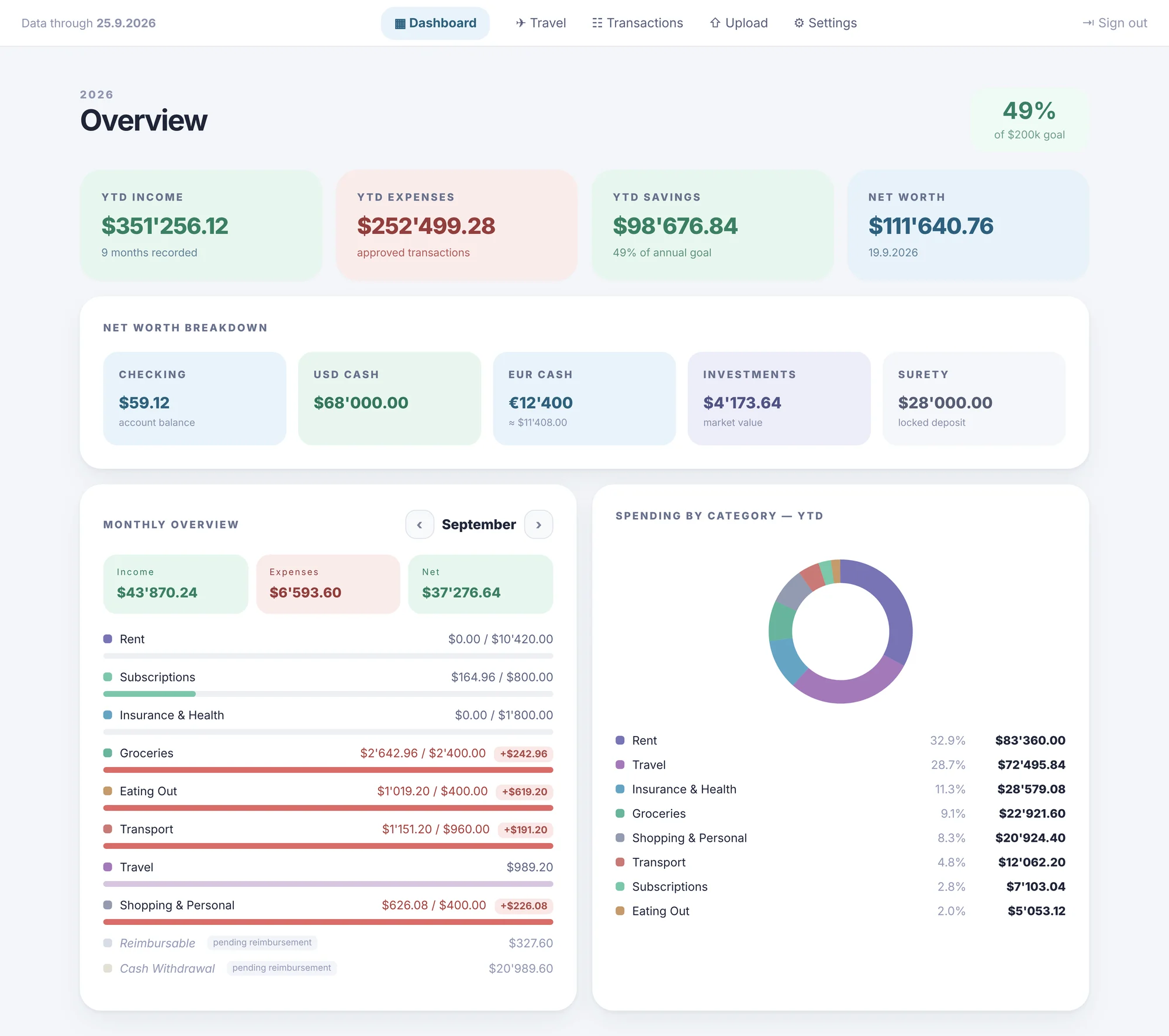 Demo data
Build your own personal finance dashboard
A step-by-step technical guide to replacing your budget spreadsheet with a real web app, built with React, Supabase, Vercel and the Claude API.
Time: A focused weekend for a first working version. A few weeks of evenings for everything in this guide.
Why build this instead of using another budgeting app
Most budgeting apps make three tradeoffs you don't have to accept once you build your own:
- They guess at your categories. You end up manually recategorizing half your transactions anyway.
- They don't match how your household actually works. Joint expenses, side income, irregular currencies, trips that span categories. Generic apps flatten all of it.
- Your data lives on someone else's server, tied to a subscription.
This guide walks through building a private, single-user finance dashboard that parses your own bank exports, auto-categorizes transactions with a rule engine (plus an AI fallback for anything the rules miss), and gives you a real dashboard: monthly P&L, savings progress toward a goal, net worth, and category breakdowns.
Total cost to run: $0 a month. Vercel free tier, Supabase free tier, and a few cents of Claude API calls.
The stack
| Layer | Tool | Why |
|---|---|---|
| Frontend | React + Vite | Fast dev loop, no framework bloat |
| Styling | Tailwind CSS | Ship UI fast without fighting CSS |
| Charts | Recharts | Clean, composable, good defaults |
| Database | Supabase (Postgres) | Free tier, instant REST API, no backend to run |
| Hosting | Vercel | Free tier, auto-deploys on git push |
| AI categorization | Claude API, through a Vercel serverless function | Handles the roughly 30% of transactions a rule engine can't confidently place |
You don't need to be a full-stack engineer to build this. You need to be comfortable pasting code, running a few terminal commands, and (this is the actual unlock) using an AI coding assistant to write most of it for you. More on that in the build-along section.
1. Architecture overview
finance-app/
├── api/
│   └── categorise.js          ← Vercel serverless function, proxies calls to Claude API
├── src/
│   ├── App.jsx                ← Nav + routing
│   ├── lib/
│   │   ├── supabase.js        ← Supabase client init
│   │   ├── anthropic.js       ← Calls your /api/categorise endpoint
│   │   └── parsers/
│   │       ├── index.js       ← Auto-detects file type, adds dedup hashes
│   │       ├── bank-checking.js
│   │       ├── bank-credit-card.js
│   │       ├── rules.js       ← Merchant → category rule engine
│   │       └── dedup.js       ← SHA-256 hash to prevent duplicate imports
│   └── pages/
│       ├── Dashboard.jsx      ← Charts + monthly breakdown
│       ├── Upload.jsx         ← CSV upload + review queue
│       ├── Transactions.jsx   ← Browse all transactions
│       └── Settings.jsx       ← Budget targets, net worth snapshot
The core idea: you export CSVs from your bank periodically and upload them through the app. A parser normalizes each bank's format into one common shape, a rule engine categorizes what it can, and anything ambiguous goes to Claude in a single batched call before landing in a "pending review" queue.
2. Database schema (Supabase / Postgres)
Run this in the Supabase SQL editor to get started. It's the real schema structure; adapt the table and column names to your own categories.
-- Core transactions table
create table transactions (
  id uuid primary key default gen_random_uuid(),
  transaction_date date not null,
  description text not null,
  amount_chf numeric(10,2) not null,   -- store in your base currency, always positive
  currency text default 'CHF',
  category text not null,              -- 'Rent', 'Groceries', etc. Exact strings matter
  travel_category text,                -- nullable: 'Transportation', 'Accommodation', etc
  trip_tag text,                       -- nullable: which trip this belongs to
  source_account_id text not null,     -- which bank/card this came from
  dedup_hash text unique not null,     -- SHA-256(date + description + amount + account)
  status text default 'pending',       -- pending / approved / flagged
  created_at timestamptz default now()
);

-- Income is tracked separately from expenses
create table income_entries (
  id uuid primary key default gen_random_uuid(),
  income_date date not null,
  source text not null,                -- 'Salary', 'Rental income', etc
  amount_chf numeric(10,2) not null,
  created_at timestamptz default now()
);

-- Excluded transactions (internal transfers): don't delete, archive
create table excluded_transactions (
  id uuid primary key default gen_random_uuid(),
  transaction_date date not null,
  description text not null,
  amount_chf numeric(10,2) not null,
  reason text,                         -- why it was excluded
  source_account_id text not null,
  created_at timestamptz default now()
);

-- Budget targets per category
create table budget_targets (
  category text primary key,
  monthly_target_chf numeric(10,2) not null
);

-- Manual monthly net worth snapshot
create table wealth_snapshots (
  id uuid primary key default gen_random_uuid(),
  snapshot_date date not null,
  checking_balance numeric(10,2),
  cash_on_hand numeric(10,2),
  investments_market_value numeric(10,2),
  created_at timestamptz default now()
);

-- Enable row-level security (fine to allow-all for a single-user app)
alter table transactions enable row level security;
create policy "allow_all" on transactions for all using (true) with check (true);
-- repeat for other tables
drop view if exists monthly_pnl cascade;
create view monthly_pnl as
  select
    date_trunc('month', transaction_date) as month,
    category,
    sum(amount_chf) as total
  from transactions
  where status = 'approved'
  group by 1, 2;
3. Parsing bank CSVs
This is the unglamorous part that matters most. Every bank exports CSVs slightly differently: different delimiters, different date formats, metadata rows before the real data starts, encoding quirks. You'll write one parser per bank account you use.
Here's a realistic structure. Adapt the delimiter, header offset and date parsing to match your own bank's export:
// src/lib/parsers/bank-checking.js

export function parseCheckingCSV(rawText) {
  // Many bank exports have several metadata rows before the real header:
  // find the actual header row rather than assuming row 0
  const lines = rawText.split('\n');
  const headerIndex = lines.findIndex(line => line.includes('Date') && line.includes('Amount'));
  const dataLines = lines.slice(headerIndex + 1).filter(l => l.trim().length > 0);

  return dataLines.map(line => {
    const cols = line.split(';'); // some banks use ; not ,
    const [date, description, amount] = cols;

    return {
      transaction_date: normalizeDate(date),       // -> YYYY-MM-DD
      description: description.trim(),
      amount_chf: Math.abs(parseFloat(amount.replace(',', '.'))),
      source_account_id: 'CHECKING_MAIN',
    };
  });
}

function normalizeDate(rawDate) {
  // Handle whatever format your bank uses: DD.MM.YYYY, MM-DD-YYYY, etc.
  const [day, month, year] = rawDate.split('.');
  return `${year}-${month.padStart(2, '0')}-${day.padStart(2, '0')}`;
}
Deduplication
Every parser should generate a stable hash, so re-uploading the same statement (or an overlapping date range) doesn't create duplicate rows:
// src/lib/parsers/dedup.js

export async function generateDedupHash(transaction) {
  const raw = [
    transaction.transaction_date,
    // normalize whitespace! this is the single most common dedup bug:
    // the same merchant string with a double-space vs single-space
    // will hash differently and silently create a duplicate
    transaction.description.replace(/\s+/g, ' ').trim(),
    transaction.amount_chf.toFixed(2),
    transaction.source_account_id,
  ].join('|');

  const encoder = new TextEncoder();
  const data = encoder.encode(raw);
  const hashBuffer = await crypto.subtle.digest('SHA-256', data);
  return Array.from(new Uint8Array(hashBuffer))
    .map(b => b.toString(16).padStart(2, '0'))
    .join('');
}
select transaction_date, description, amount_chf, count(*), array_agg(id::text)
from transactions
group by transaction_date, description, amount_chf, source_account_id
having count(*) > 1;
For provisional-date duplicates specifically, widen this to a date-range join (±2 days, same description, same amount) and eyeball the results before deleting anything.
4. Categorization: rule engine first, AI as the fallback
Don't call an AI API for every single transaction. It's slower and costs money for zero benefit on the obvious cases. A simple rule engine handles most transactions instantly, for free:
// src/lib/parsers/rules.js

const MERCHANT_RULES = [
  { pattern: /netflix|spotify/i, category: 'Subscriptions' },
  { pattern: /rent|landlord name here/i, category: 'Rent' },
  { pattern: /pharmacy|apotheke/i, category: 'Insurance & Health' },
  { pattern: /uber|transit|metro|bus/i, category: 'Transport' },
  // amount-conditional rules are useful for merchants that mean
  // different things depending on spend level
  { pattern: /gym|fitness/i, category: 'Insurance & Health', minAmount: 50 },
  { pattern: /gym|fitness/i, category: 'Eating Out', maxAmount: 50 },
];

export function applyRules(transaction) {
  for (const rule of MERCHANT_RULES) {
    if (!rule.pattern.test(transaction.description)) continue;
    if (rule.minAmount && transaction.amount_chf < rule.minAmount) continue;
    if (rule.maxAmount && transaction.amount_chf > rule.maxAmount) continue;
    return rule.category;
  }
  return null; // no match, falls through to AI categorization
}
For whatever the rules can't confidently categorize (in a real build, around 25 to 30% of transactions), batch everything into a single Claude API call rather than one call per transaction:
// api/categorise.js: Vercel serverless function
// This exists so your Anthropic API key never touches the browser (CORS + security)

export default async function handler(req, res) {
  const { transactions, categories } = req.body;

  const prompt = `Categorize each transaction into exactly one of these categories:
${categories.join(', ')}

Return a JSON array of category strings, one per transaction, in the same order.
No preamble, no markdown formatting, just the raw JSON array.

Transactions:
${transactions.map((t, i) => `${i + 1}. ${t.description}: ${t.amount_chf} CHF`).join('\n')}`;

  const response = await fetch('https://api.anthropic.com/v1/messages', {
    method: 'POST',
    headers: {
      'x-api-key': process.env.ANTHROPIC_API_KEY,
      'anthropic-version': '2023-06-01',
      'content-type': 'application/json',
    },
    body: JSON.stringify({
      model: 'claude-sonnet-5',
      max_tokens: 1000,
      messages: [{ role: 'user', content: prompt }],
    }),
  });

  const data = await response.json();
  const text = data.content[0].text.replace(/```json|```/g, '').trim();
  const categoryList = JSON.parse(text);

  res.status(200).json({ categories: categoryList });
}
Batching turns "300 transactions = 300 API calls" into "300 transactions = 1 API call". That's the difference between a categorization pass costing a fraction of a cent and costing real money.
5. The dashboard views
Once transactions are in Postgres, Supabase views do the heavy lifting. You're not writing aggregation logic in JavaScript; you write the SQL once and query the view like any other table:
create view savings_progress as
select
  month,
  sum(income) - sum(expenses) as monthly_net,
  sum(sum(income) - sum(expenses)) over (order by month) as cumulative_savings
from (
  select date_trunc('month', income_date) as month, amount_chf as income, 0 as expenses
  from income_entries
  union all
  select date_trunc('month', transaction_date), 0, amount_chf
  from transactions where status = 'approved'
) combined
group by month
order by month;
In React, fetching it is just:
const { data, error } = await supabase
  .from('savings_progress')
  .select('*')
  .order('month');
Recharts handles the charts cleanly. One gotcha: tooltips render with an ugly default box shadow unless you strip it explicitly.
<Tooltip
  wrapperStyle={{ background: 'transparent', border: 'none', boxShadow: 'none' }}
  cursor={false}
/>
6. Deployment (Vercel)
- Push your repo to GitHub.
- Connect the repo in Vercel. It detects Vite and sets the build command.
- Add your environment variables in the project settings:
SUPABASE_URL,SUPABASE_ANON_KEY,ANTHROPIC_API_KEY. - Every push to
maindeploys in about a minute.
Two deployment gotchas that will waste your time if you don't know about them:
Git identity matters. If you commit with an email that doesn't match the one connected to your Vercel project, Vercel can silently skip the deployment with no error in your terminal. If a push seems to do nothing, check the Vercel dashboard for a "Blocked" or skipped status before assuming your code is broken.
On macOS, Finder merges folders instead of replacing them. If you regenerate a batch of files and drag them into your project through Finder, stale files from the old version can survive next to the new ones. Write root-level files through Terminal, or a small deploy script, when doing a bulk update.
7. Build-along: using Claude to actually build this
You don't need to write all of the above from scratch. This whole app was built mostly by describing what I needed to Claude and iterating. The code above came from exactly that process. Here's how to do it well:
Start with schema and structure, not UI. Describe your data first: which banks you use, which categories matter, whether you're tracking a household or just yourself. Ask for the Postgres schema before any React code. Getting the data model right early saves painful migrations later.
Give it one bank statement's raw structure at a time. Paste or describe the actual column layout of your export and ask for a parser for that format, rather than a "generic CSV parser" up front. Bank formats are inconsistent enough that generic parsing usually needs a rewrite anyway.
Ask for the rule engine before the AI fallback. It's tempting to reach for an LLM call on every transaction. Resist it. Get the deterministic rule matching first, and only wire in AI for the leftovers the rules can't handle. That keeps the app fast and nearly free to run.
When something breaks, paste the actual error. "It's not working" gets you generic guesses. The literal console error, or exactly what happened versus what you expected, gets you a targeted fix.
Correct fast and let corrections stick. If a design choice is wrong (category logic, currency handling, chart layout), say so directly and move on. A plain "no, do X instead" keeps momentum.
Treat deployment issues as their own category. "The code looks right but nothing changed on the live site" is almost always deployment, not code. Check the dashboard before assuming your logic is wrong.
A first working version (CSV upload, basic categorization, one chart) takes a focused weekend. Everything in this guide (rule engine, AI fallback, trip tagging, net worth tracking, mobile layout) is closer to a few weeks of evenings.
Where to go from here
This covers the real architecture and the real code patterns, enough to build a working version yourself. If you'd rather have the finished template (pre-built schema, working parsers, a deployable starter repo), that's not in here. DM me on Instagram @cezarhere and I'll point you in the right direction.